Elements is a web application designed for musicians, producers, and
composers who want a fast and intuitive way to create chord progressions,
explore scales, and experiment with musical harmony directly in the browser.
With Elements, you can build chord progressions using a powerful 16-pad
workspace designed for speed and creativity. Each pad represents a chord slot,
allowing you to design and test harmonic ideas quickly. Experiment with different
chord progression models, modify chords instantly, and hear results in real time.
The platform combines practical music theory tools with an intuitive interface,
helping you explore new musical directions without interrupting your creative workflow.
Intervals:module
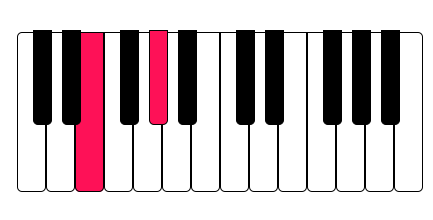
Build musical intervals instantly with the Interval Constructor in Elements.
Select a root note using the visual piano keyboard, your computer keyboard,
or a connected MIDI controller, then choose an interval type to generate the notes automatically.
The module instantly calculates and displays the interval structure, helping you
understand how notes relate within harmony. You can listen to the interval in real time,
visualize it on the keyboard, and save it to your personal library for later use.
Perfect for learning music theory, designing chord structures, and
experimenting with harmonic relationships, the Interval Constructor
makes it easy to explore intervals and use them as building blocks for chords and progressions.
Scaler:module
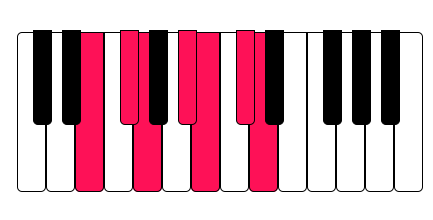
The Scale Constructor module in Elements helps you explore and
generate musical scales instantly. Choose a root note using the
on-screen piano, your computer keyboard, or a
connected MIDI controller, then select a scale type to automatically build the complete scale.
Elements displays all notes of the scale across the keyboard so you can clearly see the
harmonic structure and tonal relationships. You can play the scale, analyze its notes,
and save it to your personal library for quick access in future sessions.
This tool is ideal for music producers, composers, and music theory learners who want to
understand scales, create harmonic foundations, improvise and build chord progressions
directly from scale structures.
Chords:module
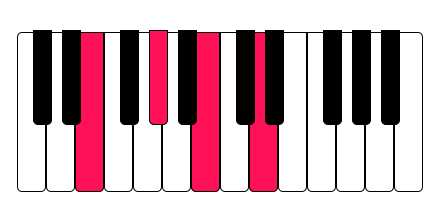
The Chord Constructor module allows you to quickly build and explore chords
from any root note. Select a note using the on-screen piano,
your computer keyboard, or a connected MIDI controller, then choose a chord
type to instantly generate the chord structure.
Elements highlights all chord tones directly on the keyboard,
making it easy to visualize intervals and understand how the
chord is built. You can listen to the chord, analyze its notes,
and save it to your personal library for later use.
This tool helps music producers, composers, and songwriters experiment
with harmony, discover new chord ideas, and quickly build the foundation for chord
progressions and musical arrangements.
Progressor:module
The Progression Builder module allows you to quickly create and experiment with chord
progressions in any key and scale. Choose your root note, select a scale,
and apply common progression patterns like 1–5–6–4 or build your own sequence from scratch.
Elements automatically generates the corresponding chords and displays them across
interactive pads, making it easy to arrange, modify, and test different
harmonic ideas. Each chord is visualized on the keyboard, helping you clearly see the
notes and intervals within the progression.
You can play back your progression in real time, tweak individual chords, save your favorite
sequences and download in .midi for future use in DAW. With MIDI and keyboard input support,
the workflow feels natural and responsive.
This tool helps producers, composers, and musicians quickly explore harmonic structures,
discover new musical ideas, and build complete
chord progressions for tracks, sound design, and live performance.

Visualize

Multi platform

Detector
A visual piano keyboard lets you see
exactly which notes are being played
in your chords and scales. You can
instantly preview every chord using the
built-in high-quality piano audio engine.
Design progressions in the browser, export them
instantly, and integrate them into your music projects without friction.
The Detector module allows you to
instantly identify intervals,
scales or chords from
incoming MIDI or keyboard input.
Elements supports MIDI controller input,
allowing you to interact with the app
using your favorite MIDI keyboard.
Save custom chord progressions.
Store scales and interval sets
Organize musical ideas in one place
*for registered users
Share progressions with other musicians around the world
Every progression you create can be
exported as a .MIDI file, making it
easy to import directly into
your preferred DAW and continue production.
Elements
is ideal for:
- Music producers
- Songwriters
- Composers
- Music theory learners
- Electronic music creators
- Anyone looking for fast harmonic inspiration
Whether you are sketching song ideas, studying
harmony, or building progressions for a track,
Elements provides a powerful and streamlined
environment for musical creativity.